
Essential Networking Concepts for Modern Software Engineers
Master essential networking concepts: IP, DNS, ports, firewalls, NAT, and Kubernetes explained through one app's growth story for software engineers.

Dilshad Akhtar
Last updated: 6 May 2026
8 min read
TLDRQuick Summary
- •IP addresses and DNS provide identification and name resolution for devices on the network
- •Ports allow multiple applications to share the same IP address
- •Network segmentation divides networks for security using subnets
- •Firewalls control traffic between network segments
- •NAT enables private servers to access the internet through shared public IPs
In this post, I'm gonna walk you through the essential networking concepts that every software engineer actually needs to know. We'll keep it simple by watching how one app grows from a single server to a massive cloud system. You'll learn each networking piece exactly when it become necessary in the lifecycle of a product. So, meet SharpTravel. This is our imaginary travel booking site built by the team at Sharp Digital. We'll see how its networking needs changes over time, and you'll get why each piece exists and how it solves real problems.
Starting at the Beginning: IP Addresses and DNS
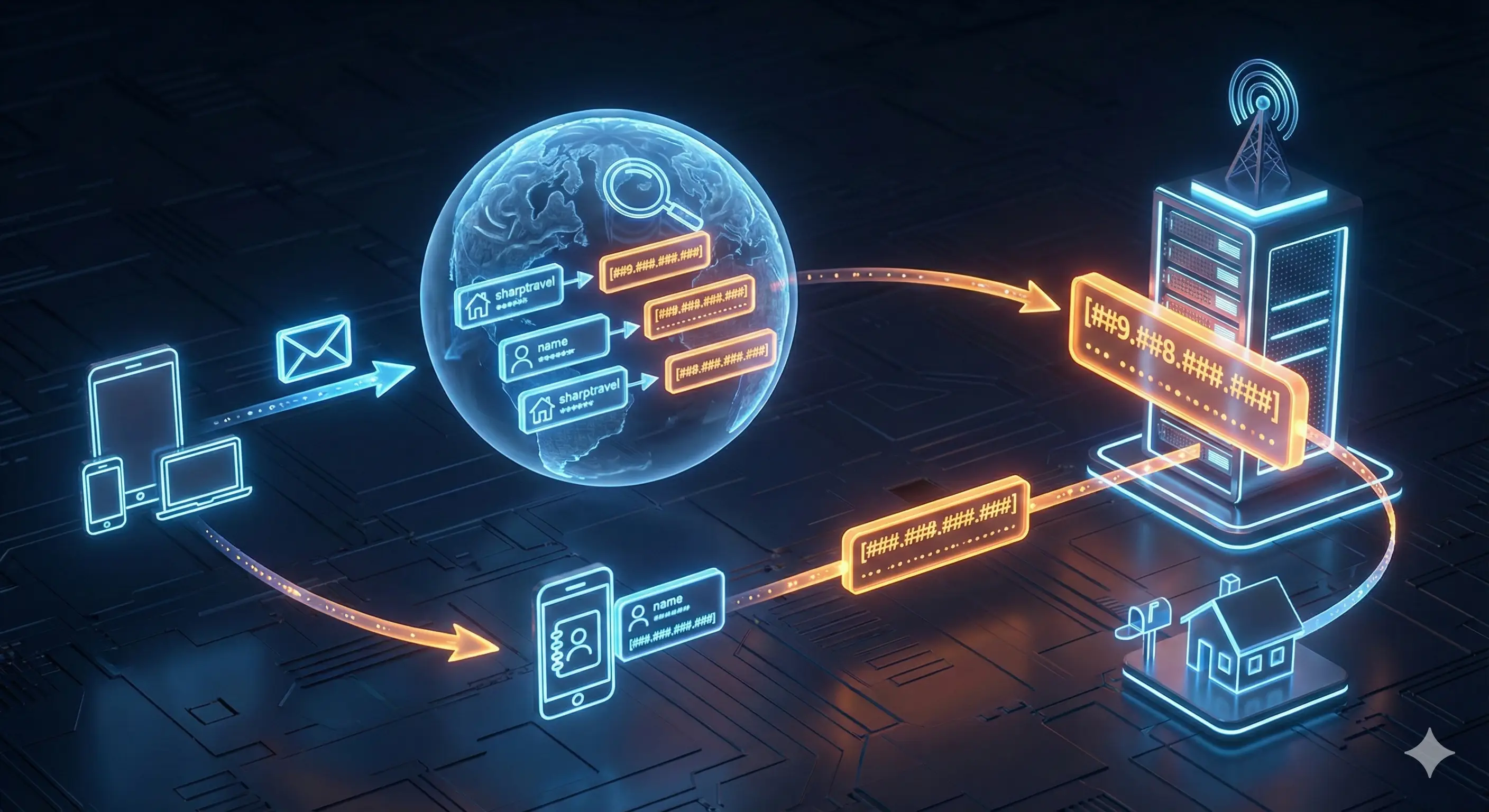
When we first launched SharpTravel, we just had one server running the whole thing. It seemed simple enough. But immediately, we faced our first question: how do customers actually find our server on the internet? Every device connected to a network need an identifier so other devices can send data to it. This identifier is called an IP address. You should think of it like a house address for mail. Without it, no one knows where to send anything. Consequently, our SharpTravel server got a public IP address, which looks like a string of numbers. This means any device on the internet can send a request to this number and reach us.
Now, you might be wondering if you need to memorize complex numbers like 203.0.113.10 to reach a website. The answer is no. Just like you don't memorize phone numbers anymore, we don't memorize IP addresses. This is where DNS comes in. DNS translate easy-to-remember names into IP addresses. When someone types sharptravel.com into thier browser, DNS looks up the IP and connects them. It works exactly like the contacts in your phone. You usually don't type the actual number to call "Mom," you just tap the name and the phone finds the number in the background. In the same way, you type google.com and DNS finds the address so customers can find our server. If you're building web applications, understanding these fundamentals is crucial for web development.
Managing Multiple Applications with Ports
Now that customers can find us, we face the next problem. Our single server is now running three different things: the website, a database, and a payment service. All three shares the same IP address. When a request hits our server, how does it know which app should get it? This is where ports solves our problem. Ports are numbered channels on a server, ranging from 1 to 65,535. Each app listens on a different port.
Let's say this is how we set it up. The website listens on port 80 (standard for web) or port 443 for secure connections. Then we have a MySQL database on port 3306. For backend development, check out our web development guide. Finally, we have a custom payment service running on port 9090. Now, when a customer visits sharptravel.com, their browser connect to port 80 or 443 automatically. The server knows to send traffic to the web app, not the database. Think of it like an apartment building. The building has one street address (the IP), but inside there is different apartment numbers (the ports).
Enhancing Security with Network Segmentation
SharpTravel is growing, and a new problem appears. We are now handling credit cards and personal info. Having everything on one server create a big security risk. If a hacker broke into the server, they would get access to everything. We need to separate things. This is called network segmentation, and subnets let us divide our network into sections. For secure web application infrastructure, segmentation is essential.
Think of it like a hospital with different wings. You have a maternity ward on one floor and surgery on another to keep things separate. We do the same. We place our front-end servers in subnet A, application servers in subnet B, and databases in another. Now the network is divided. However, if the website is in one subnet and the database in another, they need a way to talk. This is where routing become necessary. Routing directs traffic between segments. Its basically like a GPS for data; it figures out how to get from point A to point B.
Controlling Traffic with Firewalls
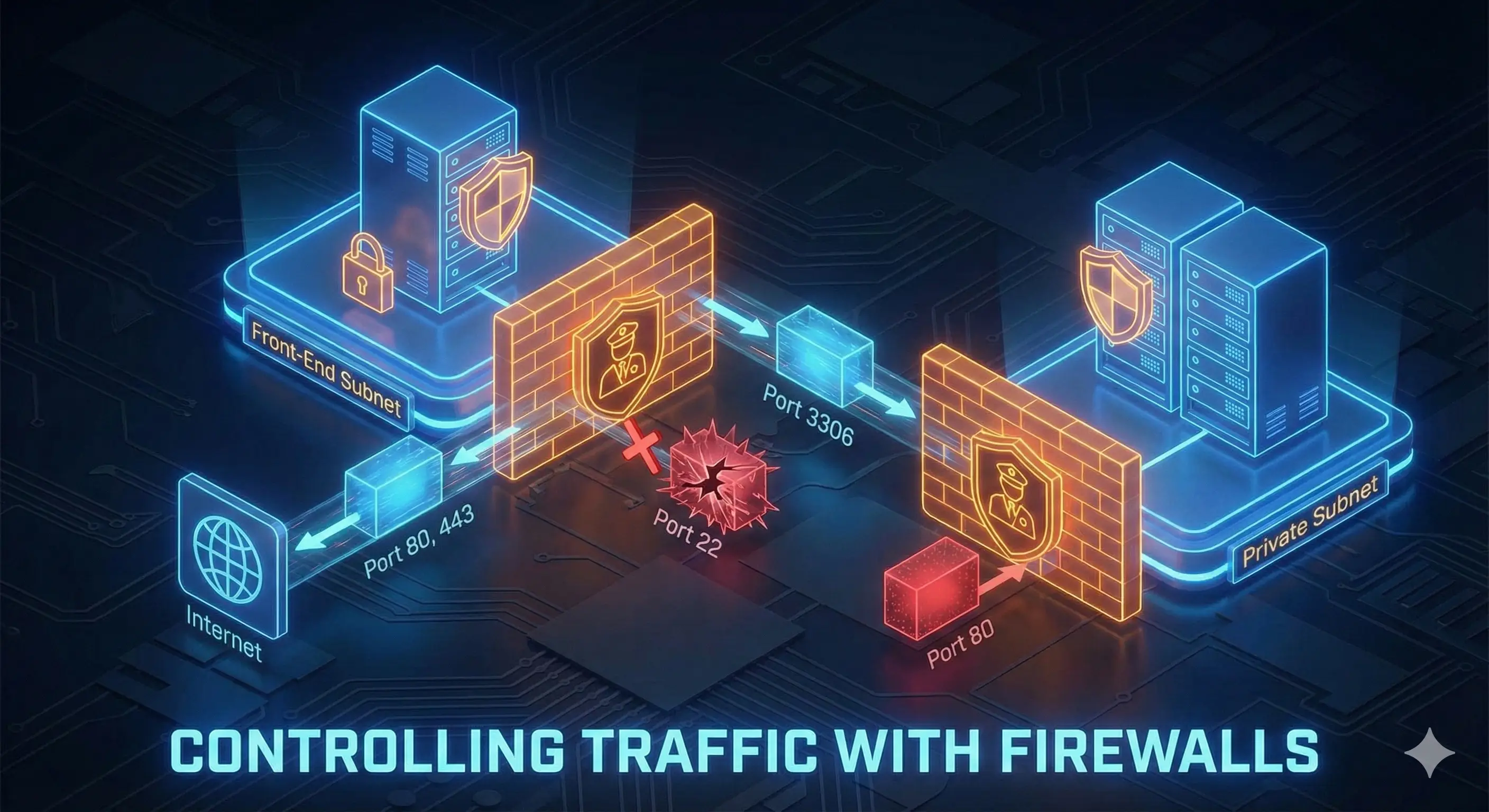
We separated things, but what stops everything from talking to everything else? We created separate rooms, but the doors are wide open. Just because we can route traffic doesn't mean we should allowed it. This is where firewalls becomes necessary. A firewall is like a security guard that checks traffic and decides whether to allow it based on rules.
We have host firewalls on individual servers. We can tell the database to only accept connections on port 3306 from the front-end subnet. Anything else get blocked. We also have network firewalls between subnets. We might place one between the internet and our front-end, allowing port 80 and 443 but blocking everything else. This layered approach means an attacker has to get through multiple checkpoints to do damage.
Solving Connectivity for Private Servers with NAT
SharpTravel is growing fast. We now have 50 backend servers in a private subnet for security. These servers has private IP addresses. Private IPs work inside your network but can't talk to the internet directly. It's like having an internal extension at an office. You can call other employees, but you can't dial out directly.
Our backend servers need to reach the internet sometimes for updates. We can't give each server a public IP because they cost money and we would need 50 of them. This is where NAT (Network Address Translation) comes in. NAT allows multiple devices with private IPs to share one public address.
Here is how it works. When a backend server wants to download updates, it sends a request to the NAT device. The NAT device replaces the private address with its own public IP and sends it to the internet. When the response come back, the NAT device remembers who asked for it and sends it to the right server. Think of it like a receptionist. When an employee needs to make an external call, the receptionist place the call using the company line and routes the answer back to the desk. Now all 50 servers can reach the internet through one IP while staying hidden.
Moving to the Cloud
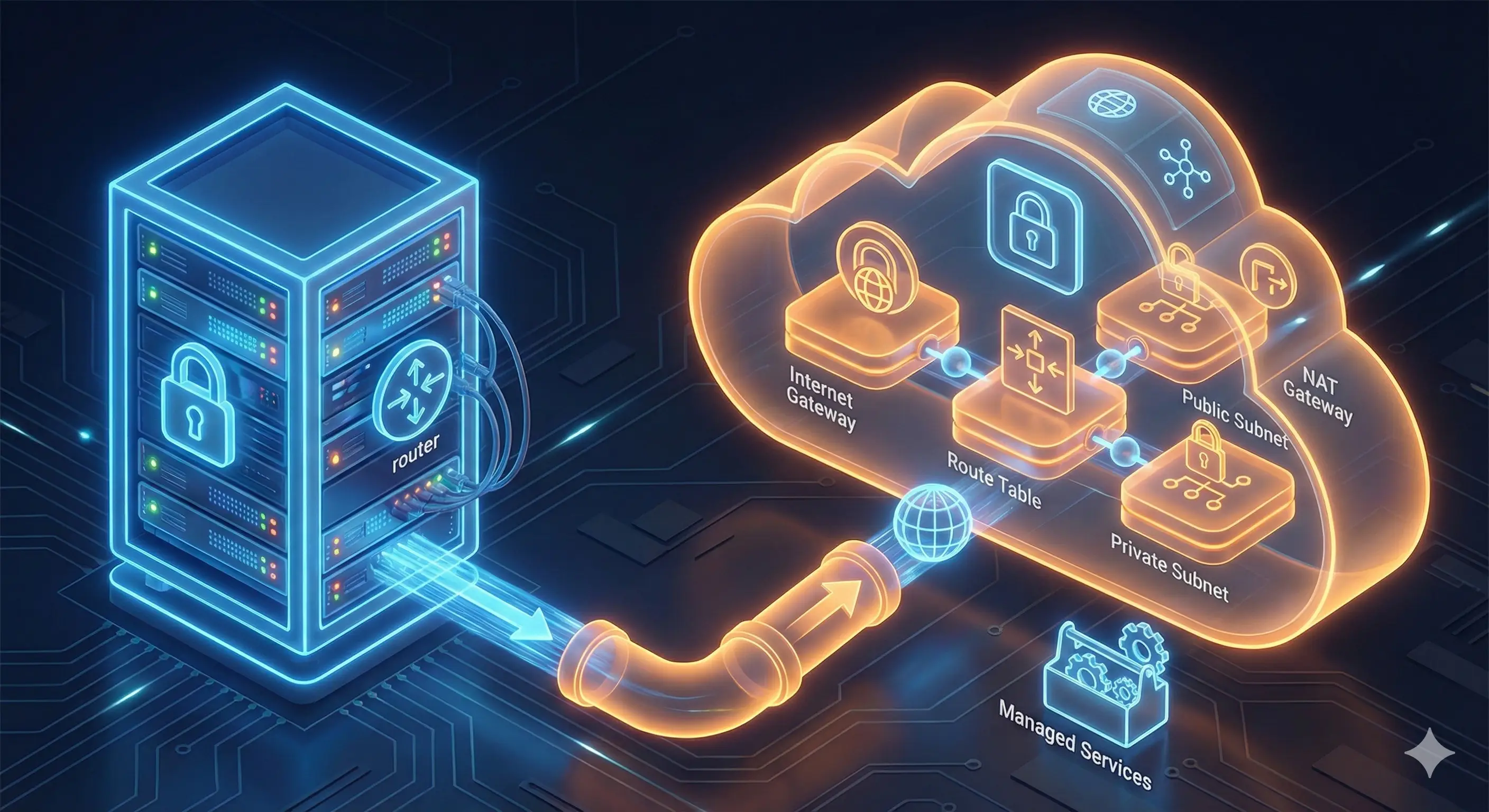
At this point, we built a solid foundation, but maintaining physical servers is expensive and slow. We decide to move SharpTravel to the cloud. The cloud means we are renting resources instead of owning them. Someone else manage the hardware.
The important part is that the networking concepts doesn't change. We still need IPs, ports, subnets, and firewalls. The cloud just provides these as managed services. In the cloud, we create a VPC (Virtual Private Cloud). This is our isolated section. Inside, we create subnets. We use an internet gateway to connect to the internet and route tables to tell data where to go. For private subnets, we use a NAT gateway, which is just the same NAT concept managed by the provider. Check out our AI integration and deployment services for more on cloud infrastructure.
Managing Infrastructure as Code
As we build this, we need a way to manage it efficiently. This is where tools like Pulumi helps. Instead of clicking buttons, we define infrastructure using code we already know, like TypeScript or Python. This lets us use our favorite IDEs. We can even use AI agents or AI chatbots to help write the code. This approach helps us manage the complexity of our system.
Scaling with Containers
As SharpTravel grows, the app gets more complex. We run into issues where code works on a laptop but not on the server. This is where containers solves our problem. A container packages the code and libraries into one portable package. Think of the difference between a food truck and a restaurant. With a food truck, everything is inside; you just drive it somewhere and cook. With a restaurant, your tied to one location.
We use Docker for this. However, containers introduce new networking concepts. When you run containers, they need to talk to each other. Docker creates a bridge network on the server. To reach them from outside, we map the internal port to the host port. We tell Docker to forward traffic from the host to the container. This is similar to the NAT concept. This is fundamental for modern infrastructure.
Orchestration with Kubernetes
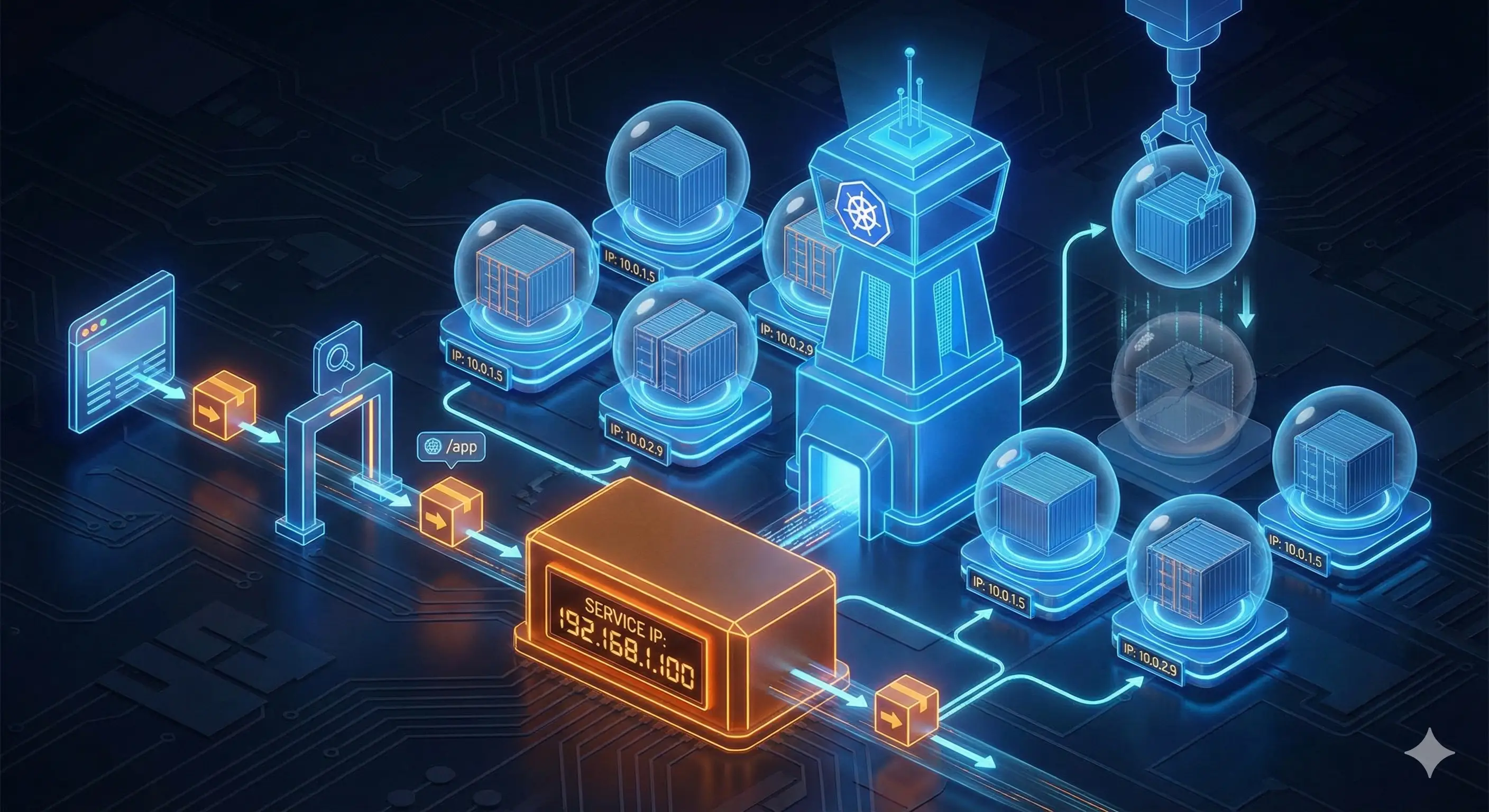
We are now running hundreds of containers. Managing this manually is impossible. We need Kubernetes. Its like an automated building manager.
In Kubernetes, the basic unit is a pod. A pod is a group of containers that share an IP. The problem is that pods are temporary. If a pod dies and a new one is created, it gets a new IP. If our app tries to connect to a database pod that changed, the connection breaks. To solve this, we use Kubernetes Services. A Service provides a stable IP that never change. We create a Service for our database. The website connects to the Service, and the Service forwards it to a healthy pod. It's like a department phone number. Finally, to expose the app to the internet, we use Ingress, which routes visitors based on the URL. For modern tech stacks, Kubernetes is essential.
Conclusion
We followed SharpTravel's journey and learned the basics. Whether your working with physical servers or the cloud, these principles remain the same.
Here is the five key concepts:
- IPs and DNS: Devices need IDs, and DNS translates names to numbers.
- Ports: Apps need different "doors" to listen on.
- Segmentation: We split networks for security.
- Firewalls: We control traffic between segments.
- NAT: Private apps need a gateway to reach the internet.
These are the foundation. The tools might change, but the concepts never does. If you master these, you'll be able to troubleshoot any system. If you need help implementing these concepts or building scalable infrastructure, feel free to contact us.
Related Articles
Discover more insights about web development and digital marketing